If your website does not show up on Google, first check whether it is indexed, with the site: operator and Search Console's URL Inspection tool. The most common causes are a noindex tag, a robots.txt that blocks crawling, no sitemap, redirect chains and a site that is simply too new. Google does not guarantee that any page will be indexed, but these fixes let it do its job.
How do you know whether Google knows your site?
Type site:yourdomain.com into Google. The pages that appear are indexed. If nothing appears, your site is probably not indexed yet, but the list is not always complete: check the page with URL Inspection before concluding.
For a precise answer, open Search Console, Google's free tool for site owners, and use URL Inspection: it tells you whether a page is in the index, when Google last crawled it and why it might be excluded.
Why doesn't Google index every page?
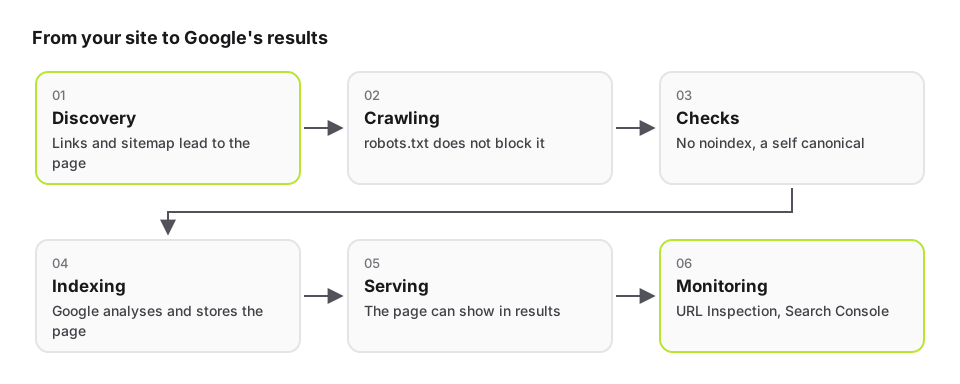
Google Search works in three stages: crawling, where its robots download pages; indexing, where it analyzes and stores them; then serving them in results. Not every page makes it through each stage. Google states that it does not guarantee to crawl, index or serve a page, even one that follows its guidelines.
In practice, a missing page is often one Google could not crawl, was asked not to index, or considers a duplicate of another.
Is a noindex tag or robots.txt blocking your pages?
The noindex rule, in the page's code or in the X-Robots-Tag HTTP header, asks Google not to index the page. It is often left behind after launch, when the test site carried one.
The robots.txt file, on the other hand, prevents crawling. The classic trap: if a page is blocked by robots.txt, Google never sees its noindex tag. To remove a page from the index, leave it crawlable and use noindex; to get it indexed, remove both blocks.
Have you submitted a sitemap?
A sitemap is a file that lists the pages you want indexed. It helps Google discover them, especially on a new site or after a site move. Submit it in Search Console and reference it in robots.txt, and list only pages that load without a redirect and that you want in the results.
Do your pages redirect in chains or contradict each other?
An address that redirects to another, which redirects again, slows crawling and blurs the signal. Likewise, a page whose canonical tag names another address asks Google to index the other one instead. Check that every old address leads to the new one in a single step, and that each page names itself as the canonical version.
- One permanent redirect between the old and the new address
- A canonical tag that points to the page itself
- One version per language, linked to the others with hreflang
- No important page reachable only through a form or an internal search
Is your site simply too new?
Google says that, once requested, crawling can take anywhere from a few days to a few weeks. Google finds new pages through links from pages it already knows and through sitemaps, so a brand-new site with no links from other sites is found later. Links from your business profiles, directories and partners help it get discovered.
How do you ask Google to crawl a page?
For a few pages, use URL Inspection in Search Console and click Request indexing. For many pages, submit or update the sitemap. Google points out that requesting a crawl does not guarantee inclusion right away, or at all: its systems prioritize useful, high-quality content.
Key takeaways
- Check indexing with site:, then with Search Console's URL Inspection
- Look for a forgotten noindex tag and an overly strict robots.txt
- Submit a sitemap that lists only final pages, with no redirects
- One-step redirects and a canonical tag pointing to the page itself
FAQ
How long does it take to appear on Google?
After a crawl request, Google says crawling can take from a few days to a few weeks, with no guarantee of indexing. A submitted sitemap and links from other sites help your pages get discovered.
Does paying Google speed up indexing?
No. Google states that it does not accept payment to crawl a site more often or rank it higher. Ranking is done programmatically.
Is Search Console required?
No, but it is the only way to see exactly why Google did not index a page and to request indexing of a single URL. It also shows whether Google has read your sitemap. It is free.
My site is indexed but does not rank for my keywords: why?
Being indexed is not enough to rank well. The page also has to answer the search precisely, be fast, well structured and linked from other pages and sites. It is content work as much as technical work.
Sources
- Google Search Central: In-Depth Guide to How Google Search Works (accessed September 29, 2026)
- Google Search Central: Ask Google to Recrawl Your Website (accessed September 29, 2026)
- Google Search Central: Block Search Indexing with noindex (accessed September 29, 2026)
- Google Search Central: How To Use the Site Search Operator (accessed September 29, 2026)
- Google Search Central: Build and Submit a Sitemap (accessed September 29, 2026)
- Search Console Help: URL Inspection tool (accessed September 29, 2026)